I remember last year when I spent ages searching for the perfect spooky motifs to decorate my kids’ trick-or-treat bags, but everything I found felt a bit too generic. That is exactly why I decided to create this halloween svg icon bundle SVG for Cricut. It is designed to add that essential touch of mischief and fun to your seasonal DIYs, whether you are hosting a themed party or simply want to spruce up your home decor. If you are ever stuck for inspiration, you can always visit Crafty Crafter to browse more free SVG files for your creative arsenal.
Creating festive projects should be a delight, not a chore. This collection of designs captures the quintessential spirit of October, making it so much easier to get into the crafting groove. Whether you are a beginner just starting with your cutting machine or a seasoned pro, you will find these files incredibly versatile for all sorts of autumn-inspired creations.
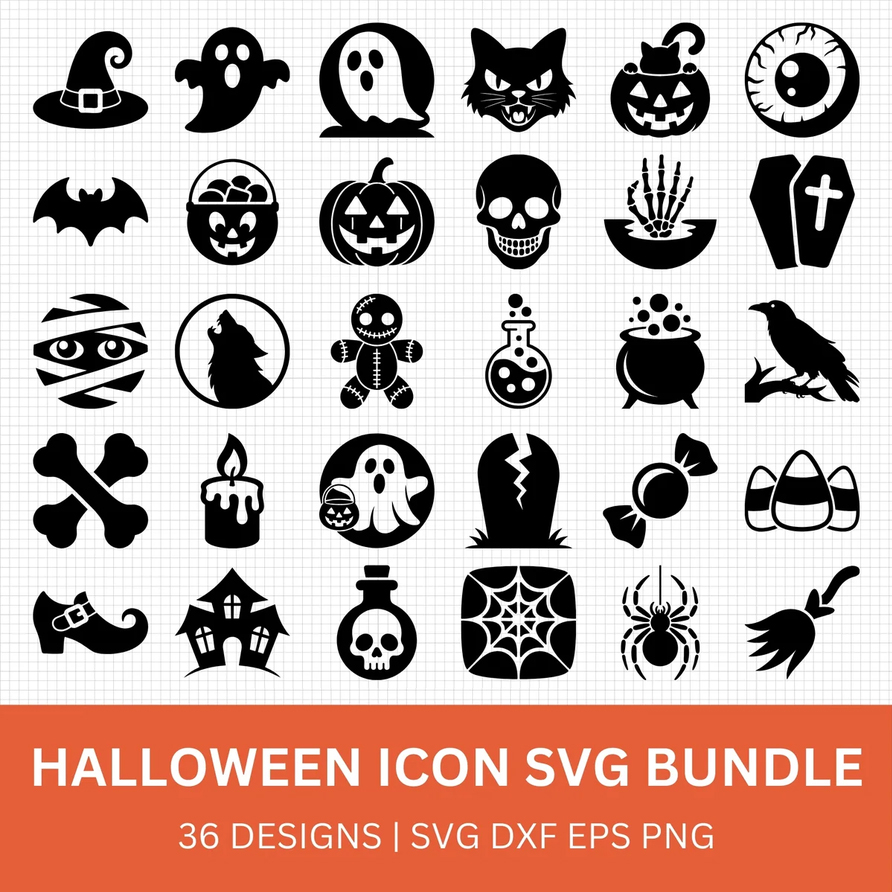
About This halloween svg icon bundle SVG for Cricut
This halloween svg icon bundle SVG for Cricut is specifically curated for crafters who love the darker, quirkier side of the autumn season. It is perfect for those who want to create personalised gifts or unique seasonal decorations without the fuss of complex designing. By exploring our library of Halloween SVGs, you can mix and match these icons with other seasonal elements to truly make your projects stand out. This bundle is ideal for parents making costumes, teachers prepping classroom decor, or anyone who simply enjoys a bit of spooky crafting fun.
What Can You Make With This halloween svg icon bundle SVG for Cricut?
- Iron-on ghost motifs using white HTV on a black tee for a classic minimalist look.
- Apply pumpkin icons using orange permanent vinyl on a ceramic mug for your morning brew.
- Create custom treat bags using heat transfer vinyl on cotton canvas totes.
- Design festive window decals using removable indoor vinyl for a quick seasonal update.
- Personalise party invitations or favour tags with small paper-cut versions of these icons.
- Make fun drink coasters by applying waterproof vinyl designs to cork or wood bases.
If you are looking for more inspiration, you might also enjoy checking out our collection of Halloween SVGs to complement your spooky creations.
How to Use This SVG in Cricut Design Space
1. Unzip the downloaded folder before uploading your files. 2. Open Cricut Design Space and select ‘Upload Image’. 3. Choose the SVG file and add it to your canvas. 4. Always remember to mirror your design if you are using heat transfer vinyl. 5. Adjust the size as needed for your specific project. 6. Note that these files are also fully compatible with Silhouette Studio. You might also love How to Make Stickers with Cricut.
More Free SVG Files You May Love
There is no limit to what you can create when you have the right tools. If you enjoy this set, you should definitely explore our range of Halloween SVGs for even more creative ideas.
Best Materials For This Cricut Project

The materials you choose can completely change how your Cricut project turns out, especially when working with detailed SVG designs. You can also find premium fonts, SVG bundles and commercial-use graphics on Creative Fabrica.
T-shirts and Tote Bags
- EasyWeed HTV for long-lasting results.
- Cotton t-shirt blanks for a smooth application surface.
- Heat-resistant tape to hold designs firmly in place.
- Stretch HTV for garments with a bit of movement.
Mugs and Decals
- Glossy permanent vinyl for a professional finish on ceramics.
- Transfer tape to ensure your design transfers cleanly.
- Burnishing scraper tools to remove bubbles.
- Waterproof vinyl for drinkware that can withstand hand washing.
Frequently Asked Questions
Is this SVG free?
Yes, this SVG is completely free to download for personal crafting use. No sign-up required.
Does this SVG work with Cricut Joy?
Yes, the file is compatible with Cricut Joy as well as Cricut Maker and Explore machines.
Can I resize the SVG?
Yes. SVG files are vector-based, meaning you can scale them up or down without any loss of quality.
Why won’t my SVG upload correctly?
Make sure you unzip the downloaded folder before uploading. Then import the .svg file directly into Cricut Design Space or Silhouette Studio.
Can I sell items I make with it?
This SVG is licensed for personal use only. You are welcome to make physical handmade items for gifts, but please do not resell or redistribute the digital file itself.
We would love to see how you use your new halloween svg icon bundle SVG for Cricut! Don’t forget to tag us or share your makes within our community. It is always inspiring to see what you create with our free SVG downloads.
Download this file then check it's Cricut-ready with SVG Doctor before you cut — it scans for stray nodes, layer issues, and anything that might cause problems in Design Space.
Check My SVG Free →