Use the free Etsy profit calculator for Cricut sellers below to find out exactly what you keep from every sale — after materials, your time, Etsy’s listing fee, transaction fee, payment processing, and optional Offsite Ads. Enter your numbers and get your real profit in seconds.
Crafty Crafter Club Tool
Etsy Profit Calculator for Cricut Sellers
Work out your real Etsy profit after materials, time, listing fees, payment fees, transaction fees and optional Offsite Ads.
Your result
Fee breakdown
How to improve this result
Before you list them, check they are Cricut-ready with SVG Doctor.
Open SVG DoctorWhy Cricut Sellers Need an Etsy Profit Calculator
Most Etsy sellers calculate profit the simple way: selling price minus materials. That misses at least four other costs that quietly eat your margins on every single sale. The result is shops that look like they’re making money but aren’t — or sellers who undercharge because they never worked out what they actually needed to charge.
This Etsy profit calculator for Cricut sellers is built specifically around the products crafters actually make and sell. It accounts for the full cost stack on every sale — not just Etsy’s headline transaction fee, but the listing renewal, payment processing, labour, packaging, postage shortfall, and Offsite Ads if they apply to your shop. The result is your actual profit per item, your margin percentage, and your effective hourly rate — the number most sellers never calculate until it’s too late.
How to Use the Etsy Profit Calculator
Step 1 — Select Your Product Type
Choose from the preset product types — HTV t-shirt, vinyl decal, tumbler decal, personalised mug, tote bag, layered cardstock, digital SVG download, SVG bundle, or custom. Each preset loads typical default values for that product type to give you a starting point. You can adjust every field manually from there.
Step 2 — Enter Your Costs
Fill in your material cost per item, packaging cost, postage charged to the customer, and your actual postage cost. If you offer free shipping — common on Etsy because it can improve search ranking — enter zero for postage charged to customer and your real postage cost in the actual postage field. The calculator treats these separately so you can see exactly how much your shipping strategy affects your margin.
Step 3 — Add Your Time
Enter how many minutes each item takes to make and your hourly rate. This is the number most sellers skip — and it’s the one that most often explains why a shop feels busy but doesn’t feel profitable. A personalised HTV t-shirt that takes 40 minutes to make and press costs £8 in labour at £12/hour, before a single piece of vinyl is cut. The calculator makes this visible so you can price accordingly.
Step 4 — Check Your Etsy Fees
The calculator pre-fills the correct 2026 Etsy fees for your selected country — UK, US, Canada, or Australia. These are editable because Etsy fees can vary based on your account status, whether VAT or regulatory operating fees apply, and any changes Etsy makes to their fee schedule. Always verify your exact rates in Etsy’s Shop Manager → Finances → Payment Account.
Step 5 — Toggle Offsite Ads If Relevant
If Etsy is running Offsite Ads for your shop — either because you’ve opted in voluntarily or because your shop earns over $10,000 per year and participation is mandatory — toggle the Offsite Ads switch. This adds the applicable 12% or 15% fee to your calculation so you can see what those ad-driven sales actually cost you in margin terms.
Step 6 — Read Your Result
The calculator shows your profit per item, your profit margin as a percentage, a full fee breakdown, and your effective hourly rate. If the result isn’t where you need it to be, use the What Should I Charge? mode — enter your costs and your target profit margin and the calculator works backwards to tell you the selling price you need to hit.
Etsy Fees in 2026 — What the Calculator Uses
Understanding which fees apply to your sales is essential for accurate profit calculations. Here is every fee this Etsy profit calculator for Cricut sellers accounts for.
| Fee | Amount | Notes |
|---|---|---|
| Listing fee | $0.20 / £0.16 per item | Charged when you publish and again every 4 months, or on each sale for multi-quantity listings |
| Transaction fee | 6.5% of total sale | Applied to item price + shipping charged to buyer + gift wrapping |
| Payment processing — US | 3% + $0.25 | Per transaction via Etsy Payments |
| Payment processing — UK | 4% + £0.20 | Per transaction via Etsy Payments |
| Payment processing — Canada | 3% + CA$0.25 | Per transaction via Etsy Payments |
| Payment processing — Australia | 3% + AU$0.25 | Per transaction via Etsy Payments |
| Offsite Ads (optional) | 15% of sale | Only on sales where a buyer clicked an Etsy-placed external ad. Can be disabled for shops under $10K/year |
| Offsite Ads (mandatory) | 12% of sale | Mandatory for shops earning over $10,000/year — cannot be turned off |
The transaction fee applies to the total order amount including shipping — a detail many sellers miss. Offering free shipping (by building postage into your item price) doesn’t reduce your fees, because Etsy still takes 6.5% of the total amount paid regardless of how it’s labelled. The calculator handles this correctly whether you charge for shipping separately or build it into your price.
What Good Profit Looks Like for Cricut Etsy Sellers
A healthy Etsy business targets a gross margin of 30–50% after all fees on a typical organic sale. Here is what that looks like across the most common Cricut product types, based on typical material costs and realistic selling prices in 2026.
| Product | Typical Sale Price | Typical Material Cost | Etsy Fees (approx) | Target Profit Range |
|---|---|---|---|---|
| Digital SVG download | $3 – $5 | $0 | $0.70 – $1.00 | $2.00 – $4.00 |
| SVG bundle (5–15 files) | $8 – $15 | $0 | $1.30 – $2.30 | $6.00 – $13.00 |
| Vinyl tumbler decal | $7 – $12 | $1.50 – $3.00 | $1.10 – $1.80 | $3.00 – $7.00 |
| HTV t-shirt (personalised) | $20 – $32 | $6 – $10 | $2.50 – $4.00 | $8.00 – $16.00 |
| Vinyl wall decal | $9 – $22 | $2 – $5 | $1.40 – $3.00 | $4.00 – $13.00 |
| Layered cardstock card | $10 – $18 | $2 – $4 | $1.50 – $2.50 | $5.00 – $11.00 |
These are ranges, not guarantees — your actual material costs, postage, packaging, and time will vary. Run your specific numbers through the calculator above to get figures that reflect your shop, not an average.
The Costs Cricut Sellers Most Often Forget to Include
Packaging
Tissue paper, a branded sticker, a thank-you card, a poly mailer or box — these add up quickly across hundreds of orders. A packaging setup that costs £0.40 per order sounds trivial until you’re sending 50 orders a month and realise it’s costing you £20 you never accounted for. Enter your packaging cost per item accurately and the calculator will reflect it in your margin.
The Postage Gap
If you charge £3.50 postage but your actual postage cost is £4.20, you’re subsidising shipping on every order. This gap is extremely common — postage prices change, heavier items cost more than estimated, and sellers often set postage rates once and forget to review them. The calculator has separate fields for postage charged and actual postage cost specifically to catch this.
Machine Wear and Consumables
Cricut cutting mats, blades, weeding tools, and eventually the machine itself all have a cost per use. Most sellers never factor this in. A cutting mat that costs £12 and lasts 50 uses costs £0.24 per project. A blade that costs £8 and lasts 100 cuts costs £0.08 per cut. These are small numbers per item but they represent a real cost of running a Cricut business that your selling price should cover.
Your Time
This is the most consistently undervalued cost in handmade selling. If you spend 30 minutes making something and sell it for £8 after fees and materials, you’re earning £16 per hour before tax — which sounds reasonable until you add in the time spent photographing, listing, answering messages, packaging, and posting. The calculator’s hourly rate field puts a number on your production time so you can see clearly whether the product is worth making at your current price.
Selling SVG Files on Etsy? Check Them Before You List
Digital SVG downloads have some of the best margins of any Etsy product — zero material cost, instant delivery, unlimited sales from a single listing. But the fastest way to turn that advantage into refund requests and negative reviews is to sell a file that doesn’t work properly in Cricut Design Space.
Stray nodes, unconverted text, unsupported effects, and excessive path complexity are all invisible when you look at an SVG file on screen — but they cause real cutting problems for buyers. Before you list any SVG file on Etsy, run it through SVG Doctor — our free Cricut SVG checker. It scans the file in seconds and gives you a Cricut Readiness Score out of 100, flagging exactly what needs fixing before a single customer sees it.
Frequently Asked Questions
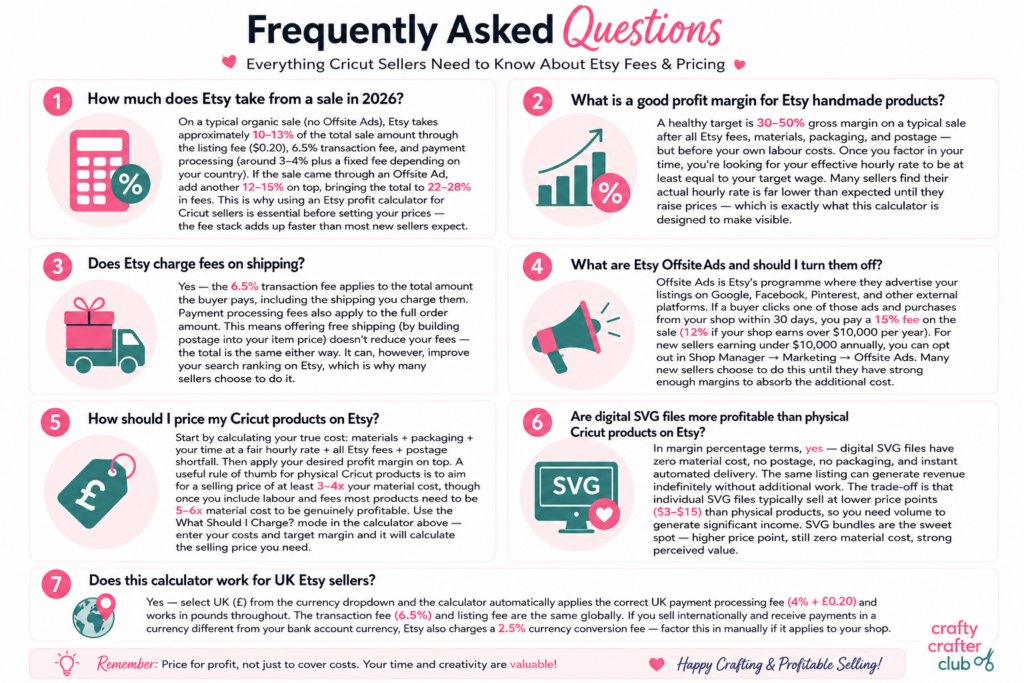
How much does Etsy take from a sale in 2026?
On a typical organic sale (no Offsite Ads), Etsy takes approximately 10–13% of the total sale amount through the listing fee ($0.20), 6.5% transaction fee, and payment processing (around 3–4% plus a fixed fee depending on your country). If the sale came through an Offsite Ad, add another 12–15% on top, bringing the total to 22–28% in fees. This is why using an Etsy profit calculator for Cricut sellers is essential before setting your prices — the fee stack adds up faster than most new sellers expect.
What is a good profit margin for Etsy handmade products?
A healthy target is 30–50% gross margin on a typical sale after all Etsy fees, materials, packaging, and postage — but before your own labour costs. Once you factor in your time, you’re looking for your effective hourly rate to be at least equal to your target wage. Many sellers find their actual hourly rate is far lower than expected until they raise prices — which is exactly what this calculator is designed to make visible.
Does Etsy charge fees on shipping?
Yes — the 6.5% transaction fee applies to the total amount the buyer pays, including the shipping you charge them. Payment processing fees also apply to the full order amount. This means offering free shipping (by building postage into your item price) doesn’t reduce your fees — the total is the same either way. It can, however, improve your search ranking on Etsy, which is why many sellers choose to do it.
What are Etsy Offsite Ads and should I turn them off?
Offsite Ads is Etsy’s programme where they advertise your listings on Google, Facebook, Pinterest, and other external platforms. If a buyer clicks one of those ads and purchases from your shop within 30 days, you pay a 15% fee on the sale (12% if your shop earns over $10,000 per year). For new sellers earning under $10,000 annually, you can opt out in Shop Manager → Marketing → Offsite Ads. Many new sellers choose to do this until they have strong enough margins to absorb the additional cost.
How should I price my Cricut products on Etsy?
Start by calculating your true cost: materials + packaging + your time at a fair hourly rate + all Etsy fees + postage shortfall. Then apply your desired profit margin on top. A useful rule of thumb for physical Cricut products is to aim for a selling price of at least 3–4x your material cost, though once you include labour and fees most products need to be 5–6x material cost to be genuinely profitable. Use the What Should I Charge? mode in the calculator above — enter your costs and target margin and it will calculate the selling price you need.
Are digital SVG files more profitable than physical Cricut products on Etsy?
In margin percentage terms, yes — digital SVG files have zero material cost, no postage, no packaging, and instant automated delivery. The same listing can generate revenue indefinitely without additional work. The trade-off is that individual SVG files typically sell at lower price points ($3–$15) than physical products, so you need volume to generate significant income. SVG bundles are the sweet spot — higher price point, still zero material cost, strong perceived value.
Does this calculator work for UK Etsy sellers?
Yes — select UK (£) from the currency dropdown and the calculator automatically applies the correct UK payment processing fee (4% + £0.20) and works in pounds throughout. The transaction fee (6.5%) and listing fee are the same globally. If you sell internationally and receive payments in a currency different from your bank account currency, Etsy also charges a 2.5% currency conversion fee — factor this in manually if it applies to your shop.
More Tools and Guides for Cricut Etsy Sellers
If you found this Etsy profit calculator for Cricut sellers useful, these guides cover everything else you need to build a profitable Etsy shop around your Cricut machine:
- How to Start an Etsy Shop in 2026 — complete beginner’s guide covering setup, fees, listing optimisation, and what’s changed on Etsy this year
- How to Use Free SVG Files to Sell on Etsy with Cricut — everything about commercial licensing, which files you can legally sell, and how to vet your sources
- SVG Doctor — free Cricut SVG checker that scans your files for Design Space problems before you list them
- HTV vs Adhesive Vinyl — which vinyl to use for which Etsy products, with sizing, care, and troubleshooting guidance