If you’ve recently discovered the world of free Cricut designs, you’re sitting on a goldmine of creative potential. Whether you’re crafting for fun, selling handmade products, or building your own brand, knowing how to use free designs like a pro will instantly level up your projects.
In this guide, we’ll walk you through everything from finding high-quality designs to using them confidently in Cricut Design Space, so your finished crafts look polished and professional.
Why Use Free Cricut Designs?
Free doesn’t mean low quality — if you know where to look.
- Save money while experimenting with new ideas
- Practice your cutting and layering skills
- Quickly create gifts, home décor, or products to sell
- Build a design library without upfront costs
New to Cricut crafting? Browse our free Cricut designs hub for more creative inspiration.
Where to Find High-Quality Free Cricut Designs
Not all free files are created equal. The best files are clean, easy to resize, and compatible with Cricut Design Space.
Look for these popular styles:
- Quote SVGs for mugs, signs and decals
- Layered mandalas for paper crafts
- Monograms and personalisation designs
- Seasonal and holiday graphics
Pro tip: Always download SVG format where possible. SVG files scale cleanly and are usually easier to work with than PNG or JPG files.
Uploading Free Cricut Designs into Design Space
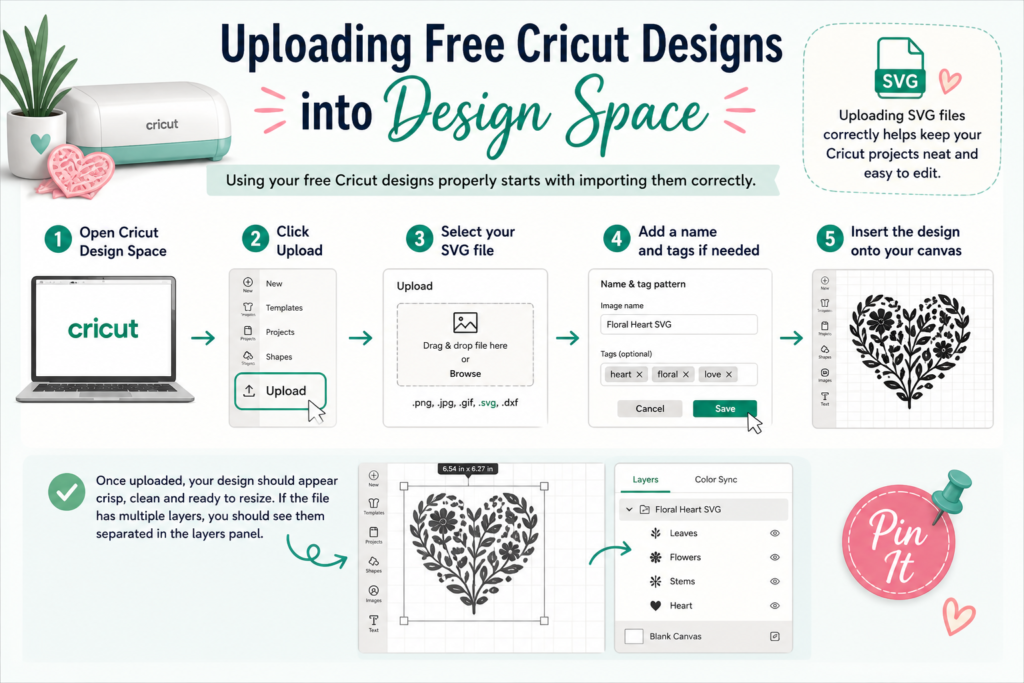
Using your free Cricut designs properly starts with importing them correctly.
- Open Cricut Design Space
- Click Upload
- Select your SVG file
- Add a name and tags if needed
- Insert the design onto your canvas
Once uploaded, your design should appear crisp, clean and ready to resize. If the file has multiple layers, you should see them separated in the layers panel.
Customising Free Cricut Designs Like a Pro
This is where beginners become confident crafters. Once your design is in Cricut Design Space, you can customise it to suit your project.
- Changing colours to match your theme
- Resizing the design for mugs, t-shirts, signs or cards
- Ungrouping elements to rearrange parts
- Combining several free Cricut designs to create something unique
For a more professional finish, try layering vinyl or cardstock. Layered projects can make simple designs look much more premium.
Choosing the Right Materials
Your material choice can make or break the finished result. Even the best design will struggle if you use the wrong vinyl, card or cutting settings.
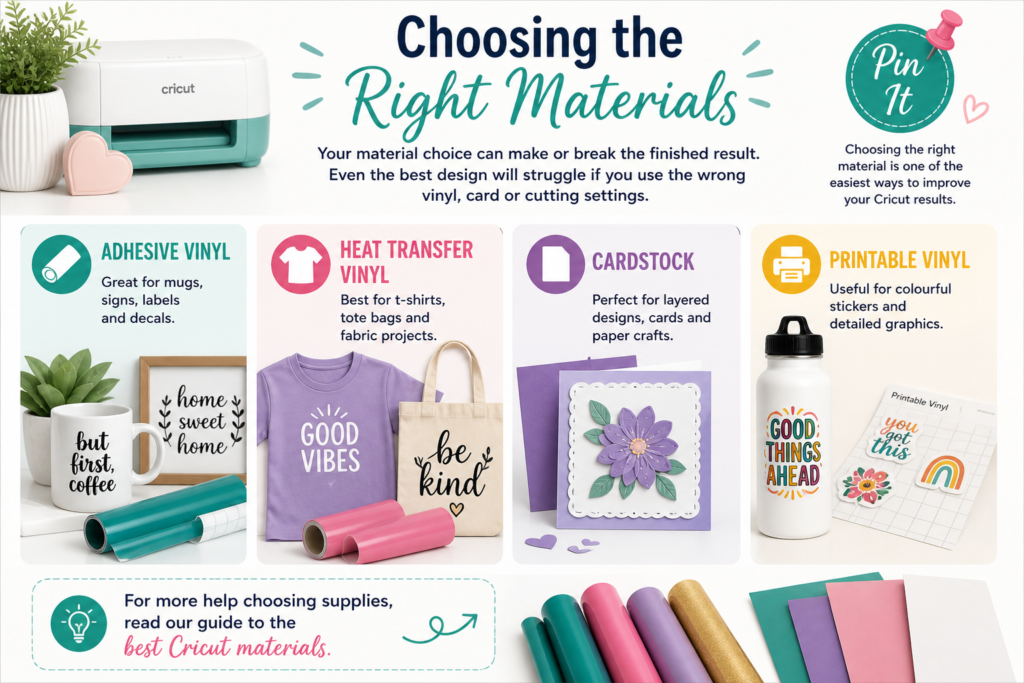
- Adhesive vinyl: Great for mugs, signs, labels and decals
- Heat Transfer Vinyl: Best for t-shirts, tote bags and fabric projects
- Cardstock: Perfect for layered designs, cards and paper crafts
- Printable vinyl: Useful for colourful stickers and detailed graphics
For more help choosing supplies, read our guide to the best Cricut materials.
Common Mistakes to Avoid
- Using low-quality or pixelated files
- Not resizing designs before cutting
- Forgetting to mirror Heat Transfer Vinyl designs
- Cutting on the wrong material setting
- Using designs without checking the licence terms
Pro Tips for Using Free Cricut Designs
- Use test cuts before your final project
- Keep a weeding tool nearby for clean results
- Start with simple designs if you are new to Cricut
- Preview every mat before cutting
- Organise your downloaded files into folders by theme
Project Ideas Using Free Cricut Designs
- Custom mugs with quote designs
- Wall decals for home décor
- Personalised tote bags
- Custom t-shirts
- Birthday cards and gift tags
- Labels for jars, storage boxes and pantry organisation
When to Upgrade to Premium Designs
Free Cricut designs are brilliant for practice and everyday crafting, but premium files can be worth it when you need something more detailed or unique.
- More detailed artwork
- Better organised layers
- Extra file formats
- Clearer commercial licence options
You can browse premium SVGs, fonts and craft bundles on Creative Fabrica.
Final Thoughts
Using free Cricut designs like a pro isn’t about spending more money — it’s about using the tools and resources you already have more effectively. With the right approach, even the simplest free SVG file can be transformed into something that looks polished, professional, and completely unique.
The key is to focus on quality over quantity. Instead of downloading hundreds of random designs, build a small, organised library of files you actually love and will use. Take the time to learn how each design works inside Cricut Design Space, experiment with layering and sizing, and don’t be afraid to tweak elements to suit your own style.
As your confidence grows, you’ll start to see just how versatile free Cricut designs really are. A single SVG can be used across multiple projects — from mugs and t-shirts to wall art and gift items — simply by changing materials, colours, or scale. This is where your creativity really starts to shine.
If you’re planning to sell your creations or build a craft-based side hustle, mastering free Cricut designs is a great place to start. It allows you to test ideas, refine your skills, and understand what works without a big upfront investment. Over time, you can then mix in premium designs to expand your range and stand out even more.
Most importantly, enjoy the process. Cricut crafting is as much about creativity as it is about the finished product. Try new techniques, learn from mistakes, and keep experimenting. The more you practise, the more “pro” your projects will naturally become.
Ready to get started? Explore our latest collection of free Cricut designs and put these tips into action today.
Download this file then check it's Cricut-ready with SVG Doctor before you cut — it scans for stray nodes, layer issues, and anything that might cause problems in Design Space.
Check My SVG Free →
[…] you love SVGs, you might also enjoy our Free Cricut Designs to expand your crafting […]