If your heat transfer vinyl is peeling, lifting, cracking or refusing to stick properly, the problem is often the heat setting, pressing time or pressure.
This Cricut HTV temperature chart is designed as a quick reference guide for common Cricut projects, including t-shirts, hoodies, tote bags, aprons and polyester garments.
Use this page as a handy cheat sheet, but always check the instructions for your exact HTV brand and blank before pressing.
Cricut HTV Temperature Chart
| Project / Material | Temperature | Pressing Time | Pressure | Peel |
|---|---|---|---|---|
| 100% Cotton T-Shirt | 315°F / 157°C | 30 seconds | Firm | Cool or warm peel depending on HTV |
| Cotton Blend T-Shirt | 315°F / 157°C | 30 seconds | Firm | Check HTV instructions |
| Polyester T-Shirt | 280°F / 138°C | 10–15 seconds | Light to medium | Check HTV instructions |
| Hoodie | 315°F / 157°C | 30 seconds | Firm | Check HTV instructions |
| Sweatshirt | 315°F / 157°C | 30 seconds | Firm | Check HTV instructions |
| Canvas Tote Bag | 315°F / 157°C | 30 seconds | Firm | Check HTV instructions |
| Apron | 315°F / 157°C | 30 seconds | Firm | Check HTV instructions |
| Pillow Cover | 315°F / 157°C | 30 seconds | Firm | Check HTV instructions |
Important: These are general guide settings. Cricut recommends using the official Cricut Heat Guide or Cricut Heat app for exact time, temperature and pressure settings based on your heat press, iron-on material and base material.
Printable Cricut Heat Press Cheat Sheet
Cricut HTV Quick Settings
| Material | Temp | Time |
|---|---|---|
| Cotton | 315°F | 30 sec |
| Cotton Blend | 315°F | 30 sec |
| Polyester | 280°F | 10–15 sec |
| Canvas | 315°F | 30 sec |
| Hoodies | 315°F | 30 sec |
Print this section or save it to your craft room for quick reference.
EasyPress vs Heat Press: Do You Need Different Settings?
Cricut EasyPress and a traditional heat press can both be used for HTV projects, but the pressure can feel different.
A traditional heat press usually gives more even pressure across the whole design. With an EasyPress, you need to make sure you are pressing on a firm, flat surface and applying consistent pressure.
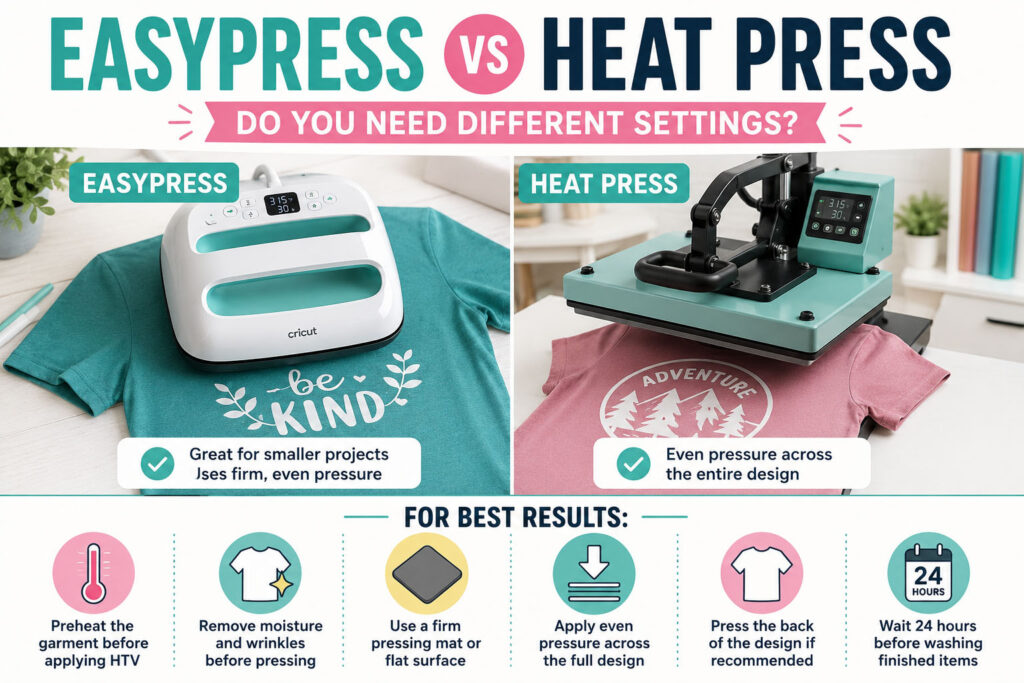
For best results:
- Preheat the garment before applying HTV
- Remove moisture and wrinkles before pressing
- Use a firm pressing mat or flat surface
- Apply even pressure across the full design
- Press the back of the design if recommended
- Wait 24 hours before washing finished items
Why Is My HTV Peeling?
If your HTV starts peeling after pressing or washing, one of these problems is usually the cause.
1. Temperature Too Low
If the temperature is too low, the adhesive on the HTV may not activate properly. This can cause edges to lift or the whole design to peel away.
2. Not Enough Pressure
HTV needs pressure as well as heat. If you are using an EasyPress, make sure your surface is firm and not soft like an ironing board.
3. Pressing Time Too Short
If you lift the press too early, the vinyl may not bond fully with the fabric.
4. Washing Too Soon
Allow your finished item to rest for at least 24 hours before washing. Wash inside out and avoid bleach.
What Temperature Should I Use for Cricut Everyday Iron-On?
For many cotton and cotton-blend projects, Cricut Everyday Iron-On is commonly pressed at around 315°F / 157°C for approximately 30 seconds with firm pressure.
However, the exact setting can change depending on your base material and heat press. Always check the Cricut Heat Guide before working on a valuable blank.
Can You Use HTV on Polyester?
Yes, you can use HTV on polyester, but you need to be more careful with heat.
Polyester can scorch, shrink or melt if the temperature is too high. A lower temperature such as 280°F / 138°C for 10–15 seconds is a safer starting point for many polyester items.
Always test press first if you are unsure.
HTV Pressing Tips for Better Results
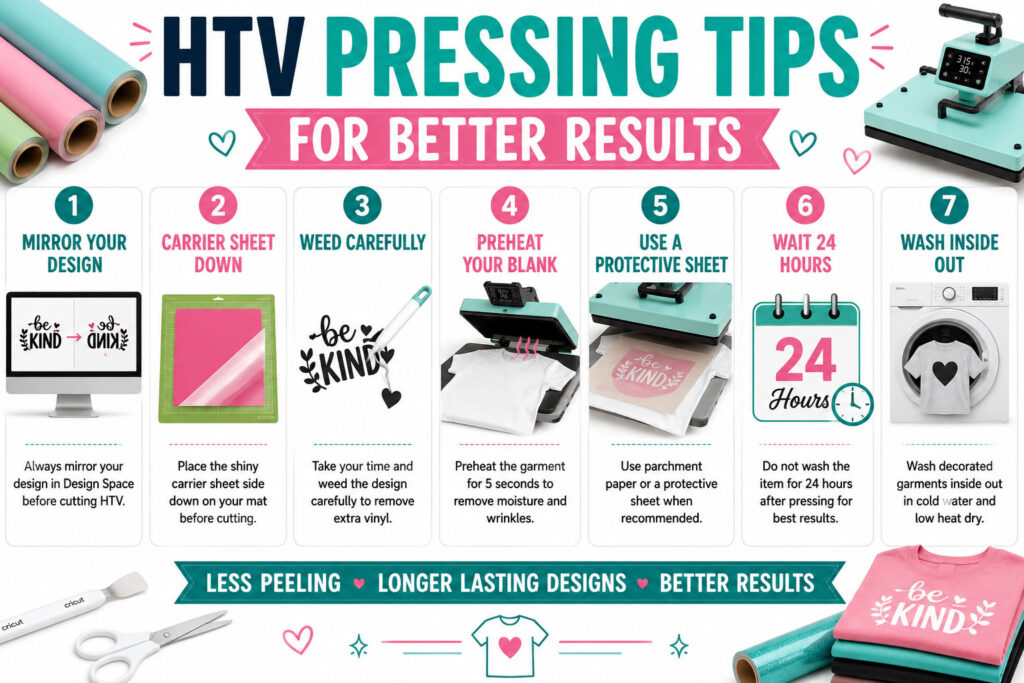
- Mirror your design before cutting HTV
- Place the shiny carrier sheet side down on your mat
- Weed the design carefully before pressing
- Preheat the blank before applying the vinyl
- Use a protective sheet if needed
- Do not wash the item for 24 hours after pressing
- Wash decorated garments inside out
Related Cricut Guides
You may also find these Cricut guides helpful:
Frequently Asked Questions about the Cricut HTV Temperature Chart
What is the best Cricut HTV temperature?
For many cotton projects, 315°F / 157°C for around 30 seconds is a common setting. The best setting depends on your HTV type, fabric and heat press.
What temperature should I use for polyester?
Polyester usually needs a lower temperature than cotton. Around 280°F / 138°C for 10–15 seconds is a useful starting point, but always test first.
Why is my HTV not sticking?
HTV may not stick if the temperature is too low, the pressure is too light, the pressing time is too short, or the fabric contains moisture.
Should I use hot peel, warm peel or cool peel?
This depends on the type of HTV you are using. Some vinyl needs to be peeled warm, while other types need to cool completely before the carrier sheet is removed.
Can I use a normal household iron for HTV?
Yes, but a household iron can be less consistent because the heat and pressure may not be even. Turn off steam and use firm pressure on a flat, stable surface.
Final Thoughts
A good Cricut HTV temperature chart can save you a lot of wasted vinyl, ruined blanks and frustrating peeling problems.
For most cotton projects, 315°F for 30 seconds is a useful starting point. For polyester, reduce the heat and test carefully before pressing your final design.
Bookmark this Cricut HTV temperature chart and keep it nearby whenever you are making t-shirts, hoodies, tote bags, aprons or other heat transfer vinyl projects.
Download this file then check it's Cricut-ready with SVG Doctor before you cut — it scans for stray nodes, layer issues, and anything that might cause problems in Design Space.
Check My SVG Free →