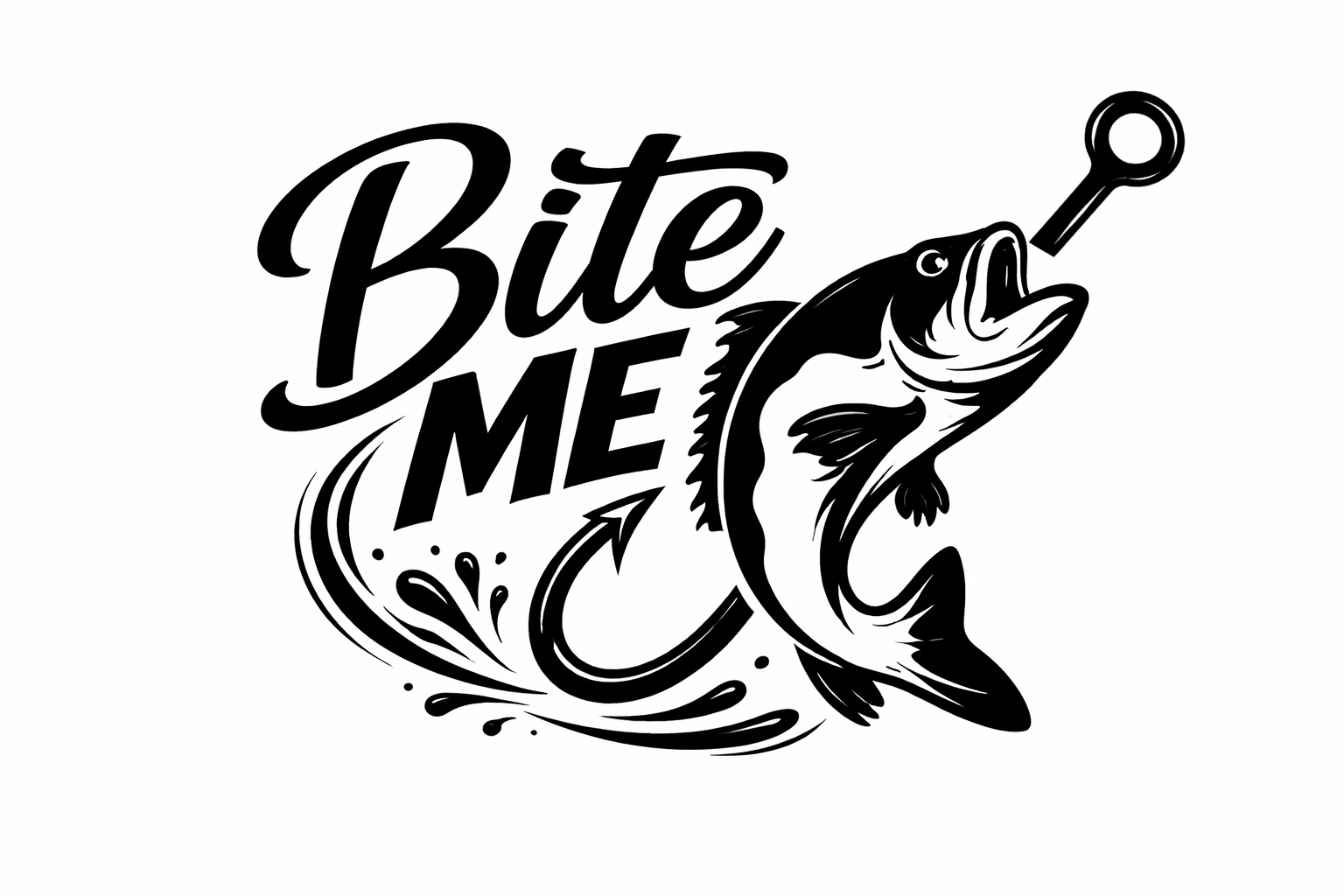
If you’re passionate about crafting and enjoy working with your cutting machine, you’re in for a treat! Today, we’re excited to introduce our adorable free bite me SVG file, inspired by the thrill of fishing. Perfect for both Cricut and Silhouette users, this design is versatile enough for various crafting projects. Whether you’re decorating your outdoor gear or creating custom gifts, this design will surely make a splash! Don’t forget to check out additional resources at Crafty Crafter for more inspiration!
Imagine using this playful phrase paired with a whimsical bass fish illustration to create vibrant decals or stunning apparel. This design is an excellent starting point for seasoned crafters looking to enhance their collection and create something truly unique. Grab your cutting machine, and let’s dive into crafting!
About This Free Bite Me SVG
This free bite me SVG file features a fun design centered around fishing culture. The playful text paired with a stylized fish makes this SVG a perfect choice for crafters who love the outdoors and want to express their love for fishing through custom crafts. This design falls into the 4 x 4 category, making it suitable for various projects without the hassle of resizing.
What Can You Make With This Free SVG?
- Vinyl decals for your car or boat
- Custom t-shirt designs for fishing trips
- Tote bags for carrying gear to your favorite angling spot
- Mugs for coffee lovers who appreciate a bit of fishing humor
- Wall art to decorate your fishing nook or man cave
- DIY gifts for your fishy friends
- Stickers to personalize your fishing tackle boxes
Looking for more inspiration? Check out our guide on How Do Cricut and Silhouette Compare? for more insights on crafting with these powerful tools.
Why Crafters Love SVG Files
SVG files unlock a world of possibilities for crafting enthusiasts. They are high-quality, scalable cut file designs perfect for cutting machines like Cricut Design Space and Silhouette Studio. SVGs also allow for intricate layering in projects, making it easy to create stunning visuals with vinyl, heat transfer vinyl (HTV), and other materials. With the right SVG designs in hand, you can explore themes beyond fishing, such as animal SVGs, farmhouse SVGs, or even fun quote SVGs to enhance your crafting experience.
How to Use This SVG in Cricut Design Space
- Begin by downloading your free bite me SVG file from the link above.
- Open Cricut Design Space or Silhouette Studio on your computer.
- Upload the SVG file by selecting the upload button and navigating to where you saved the file.
- Once uploaded, you can resize it to your desired dimensions and place it on your cutting mat layout.
- Choose the material you plan to cut (vinyl, HTV, etc.), then proceed with the cutting process.
- After cutting, weed out the excess material, and transfer your design to your chosen surface.
More Free SVG Files You May Love
If you’re enjoying this SVG, be sure to explore other designs available on our site! We have a vast collection of More Free SVG Files for Cricut just waiting for your creative touch. Whether you’re interested in humorous designs or themed graphics, you’re bound to find something that speaks to you!
Helpful Crafting Resources
To elevate your crafting projects, consider exploring additional resources for fonts, graphics, and SVG designs that can spice up your creations. A recommended source is Creative Fabrica, where you can find an array of design tools to enhance your work.
As you dive into creating with your new SVG file, we’d love to see what you come up with! Share your makes with the community, and don’t forget to keep browsing our free SVG downloads at Crafty Crafter.
Download this file then check it's Cricut-ready with SVG Doctor before you cut — it scans for stray nodes, layer issues, and anything that might cause problems in Design Space.
Check My SVG Free →