If you’ve ever asked yourself how to sell Cricut crafts online, you’re in good company. Every year, thousands of crafters turn their passion for handmade projects into thriving businesses. From vinyl mugs to personalized ornaments and paper cards, Cricut machines open the door to endless creative opportunities. But where do you start? Which websites actually help you sell, and what tips make your crafts stand out?
In this guide, you’ll learn everything from the basics of SVG files, to uploading designs, to choosing the best websites to sell Cricut crafts online. We’ll also share ideas for seasonal SVG projects, expert crafting tips, and an FAQ to clear up common questions.
What Are SVG Files?
Before diving into selling, let’s cover the foundation: SVG files.
SVG stands for Scalable Vector Graphics. Unlike JPEG or PNG images, SVGs are vector-based — which means they scale infinitely without losing quality. This is crucial for crafting because Cricut and Silhouette machines need precise instructions on where to cut.
- Why SVGs matter for Cricut: They allow you to cut intricate designs like snowflakes, lettering, or layered paper art with perfect precision.
- How crafters use them: From T-shirt decals to gift boxes, SVG files are at the heart of nearly every Cricut project.
- Why buyers love SVG-based products: They’re customizable, personal, and often look “pro-level” without requiring advanced skills.
In short: understanding SVG files is the first step to creating and selling beautiful Cricut crafts.
How to Use SVG Files with Cricut/Silhouette
If you want to sell Cricut crafts, you’ll also need to teach your customers (and yourself!) how to use SVGs effectively. Here’s the step-by-step process:
Step 1: Downloading SVGs
- Find trusted sources: Crafty-Crafter.club, Creative Fabrica, Design Bundles.
- Download your chosen SVG.
- If it’s in a ZIP folder, extract/unzip before uploading.
Step 2: Uploading to Software
- Open Cricut Design Space or Silhouette Studio.
- Click “Upload” → “Upload Image”.
- Select your SVG file.
- Insert into your project canvas.
Step 3: Cutting & Project Ideas
- Resize and position your design.
- Select your material (vinyl, iron-on, cardstock).
- Load your mat and press “Go.”
- Use SVGs to create: mugs, gift tags, wall art, tote bags, ornaments, and seasonal décor.
Inspirational Quotes SVG Collection
One of the most evergreen product categories is quotes SVG files. These sell well year-round and work across different products — mugs, T-shirts, tote bags, and wall art.
Popular Quotes SVGs
“Talk Less Do More” SVG File
- Minimalist typography, perfect for motivational mugs or wall prints.
- Easy to cut with adhesive vinyl or cardstock.
“Make Today Amazing” SVG File
- Bright, cheerful style for planners, water bottles, or T-shirts.
- Layered SVG design makes it pop with multiple colors.
“Create Every Day” SVG File
Perfect for wall decals in craft rooms or as a reminder on mugs and notebooks. The bold lettering works well for both vinyl and iron-on projects.
“Joy in the Journey” SVG File
A versatile design that’s great for greeting cards, tote bags, or framed prints. Its script style adds elegance, making it ideal for gifts.
“Good Things Take Time” SVG File
Motivational and timeless, this phrase is perfect for planners, T-shirts, or stickers. A layered SVG version can add dimension and color contrast.
Free vs Paid SVG Files
When you’re starting out with Cricut, free SVG files are a fantastic way to practice new projects and build your design library without spending money. Many craft websites, including Crafty-Crafter and Creative Fabrica, offer free downloads. However, most of these freebies are intended for personal use only — meaning you can cut them for gifts, home décor, or personal projects, but you cannot legally sell items made from them.
On the other hand, paid SVG files typically come with a commercial license, allowing you to sell finished products like mugs, shirts, or cards that use the design. These files are usually higher quality too — clean cut lines, organized layers, and professional formatting that save time and materials when crafting.
A Quick Word About Copyright
SVG files, like any creative work, are protected by copyright law. That means the designer owns the rights to their work unless they explicitly give you permission (through a license) to use it commercially. Using free files for business purposes without permission can lead to legal issues. That’s why it’s important to always read the license terms before selling.
In short:
- Free SVGs = great for personal projects, testing designs, or learning.
- Paid SVGs = safer choice for business, usually include commercial rights.
| Category | Free SVG Files | Paid SVG Files |
|---|---|---|
| Cost | $0 | $2–$10+ (per file/bundle) |
| Quality | Basic; may include extra nodes or rough paths | Cleaner cut lines; layered, production-ready |
| Licensing | Usually personal use only | Often includes commercial license |
| Best Use | Practice, gifts, personal crafts | Selling crafts, pro client work |
Seasonal & Trending SVGs
Seasonal designs = big money makers and those who sell Cricut crafts. Think about how shoppers behave: they want custom gifts, decorations, and personal touches around holidays.
- Christmas SVGs: Ornaments, stockings, layered paper snowflakes.
- Halloween SVGs: Pumpkin faces, spooky quotes, treat bag toppers.
- Fall/Thanksgiving SVGs: Leaves, “Give Thanks” quotes, table décor.
- Teacher/School SVGs: “Best Teacher Ever” mugs, back-to-school name labels.
- Wedding/Bride SVGs: Bridal party shirts, favors, invitations.
By rotating seasonal SVGs, you’ll always have fresh content in your shop and a reason for customers to come back.
Download your Free copy of our Seasonal and Trending SVGs Cheat Sheet
Tips for Crafting with SVGs
Want your Cricut crafts to look professional (and worth buying)? Follow these pro tips:
Best Materials
- Vinyl: Great for mugs, T-shirts, signs.
- Cardstock: Perfect for cards, banners, 3D crafts.
- Iron-on: Essential for clothing and tote bags.
- Specialty materials: Faux leather, wood veneer, acetate for unique projects.
Free Software & Tools
- Inkscape (free): Edit or customize SVG files.
- Canva: Create mockups for your shop listings.
- Cricut Design Space: Default software for uploads and resizing.
More Pro Tips
- Use Mockups for Listings
Showcase your designs in realistic settings (mugs, shirts, wall art) with mockup images. This makes your shop listings look more professional and helps customers imagine the final product. - Calibrate Your Machine Regularly
Keep your Cricut blades and sensors properly aligned. A quick calibration ensures clean, accurate cuts and avoids wasted material. - Invest in Transfer Tape & Tools
Weeding tools, scrapers, and high-quality transfer tape will save time and make your vinyl projects look sharp and polished.
Where to Sell Cricut Crafts Online
Now let’s tackle the most important question: where can you sell your Cricut crafts online?
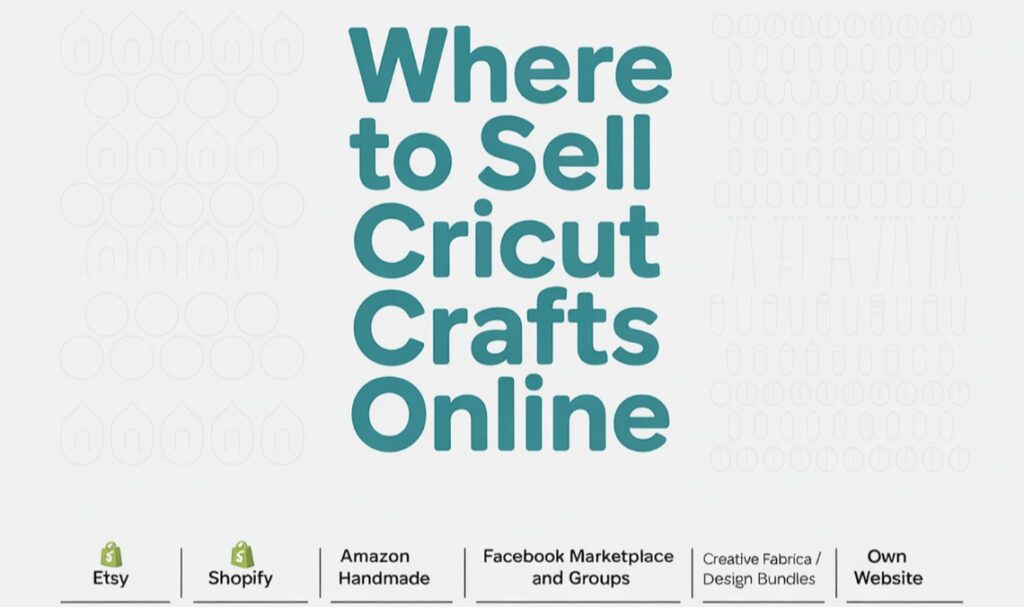
Etsy
Etsy is the largest online marketplace for handmade and digital crafts. It has a huge built-in audience searching daily for Cricut projects like SVG files, T-shirts, mugs, and home décor. The downside is high competition and listing fees, but it’s the easiest place to start selling quickly.
Shopify
Shopify is an e-commerce platform that lets you create your own branded store. Unlike Etsy, you have full control over your shop’s design, pricing, and marketing. It requires monthly fees and traffic-building, but it’s ideal for sellers ready to grow a long-term business.
Amazon Handmade
Amazon Handmade is Amazon’s dedicated section for artisan and craft products. It offers massive reach and trust from shoppers, but has stricter application processes and higher fees than Etsy. Great for physical Cricut items like custom gifts or décor.
Facebook Marketplace & Groups
Facebook Marketplace and craft groups are great for selling locally or building a community around your crafts. It’s free and fast but limited in reach compared to e-commerce platforms. Best for quick personalized gifts or testing product ideas.
Creative Fabrica / Design Bundles
These niche craft marketplaces focus on digital downloads like SVG files, fonts, and graphics. They attract an audience already looking for Cricut files, making them ideal if you want to sell digital-only products.
Own Website (WordPress + WooCommerce)
Building your own website with WordPress and WooCommerce gives you complete ownership of your store. You avoid marketplace fees, build your brand, and gain more control, but it requires SEO, marketing, and setup work. It’s the best long-term strategy for sellers serious about growth.
| Platform | Why It Works | Best For |
|---|---|---|
| Etsy | Built-in audience, great for beginners | SVGs, small crafts |
| Shopify | Full control, branding | Larger shops, advanced sellers |
| Amazon Handmade | Huge traffic, trusted | Handmade Cricut crafts |
| Facebook Marketplace & Groups | Local buyers, instant sales | Personalized gifts |
| Craftsy / Creative Fabrica / Design Bundles | Digital craft communities | Selling SVG files directly |
| Your Own Website (WordPress + WooCommerce) | Full control, no fees | Long-term brand building |
Pro Tip: Start on Etsy for traffic, then expand to your own site to keep more profit.
Frequently Asked Questions
How do I download SVG files?
To download SVG files, click the download button or link provided by the source. Most files come in a ZIP folder — unzip it first, then upload the .SVG file into Cricut Design Space. Always make sure you’re selecting the actual .SVG file extension, not a PNG or JPG.
Can these SVG files be used for commercial projects?
Some SVGs are personal-use only, while others come with a commercial license. Always check the licensing terms included in the download. If you plan to sell products (like mugs, shirts, or cards) using the design, look specifically for SVGs labeled as “commercial use allowed.”
Why won’t my SVG files upload to Cricut?
The most common issue is uploading the wrong file type — Cricut requires .SVG format, not PNG or JPG. Another issue may be a corrupted or incomplete download, so try re-downloading and unzipping the file again. If problems continue, clear your browser cache and restart Cricut Design Space.
Are these SVGs compatible with Silhouette Studio?
Yes, but you’ll need the Designer Edition or higher of Silhouette Studio to open SVG files directly. The free basic edition only accepts proprietary file types unless you upgrade.
What’s the difference between free and paid SVGs?
Free SVGs are great for beginners and simple projects, but paid designs often come with more complex layers, cleaner cut lines, and commercial licenses. If you’re planning to sell crafts, investing in premium SVGs can save time and produce more professional results.
How do I know if an SVG is high quality?
A good SVG file should have smooth cut lines, well-organized layers, and minimal unnecessary nodes (anchor points). Poor-quality SVGs can cause messy cuts or wasted materials. Always test on scrap vinyl or paper before starting a big project.
Related Free Resources
And Finally
Selling Cricut crafts online is easier than ever. With a little planning, you can combine SVG files, seasonal projects, and the best marketplaces to create a steady stream of income from your hobby.
Don’t wait until the next holiday rush — get free SVG files today, start crafting, and open your shop. The sooner you begin, the sooner your Cricut crafts can become a real business.
Remember, you need to be planning months in advance. You need to start thinking about Christmas in September!