The Joy of Cricut Christmas Crafting
Every holiday season, crafters around the world bring their creativity to life with handmade cards, ornaments, shirts, mugs, and home décor. One of the best ways to make professional-quality designs at home is by using free SVG files for Cricut for Christmas.
SVG (Scalable Vector Graphics) files are the preferred format for Cricut machines because they allow you to cut crisp, precise lines. From snowflakes and Santa hats to reindeer silhouettes and festive quotes, SVGs open up a world of possibilities for holiday crafting.
In this guide, you’ll discover:
- Why SVGs are essential for Cricut Christmas projects
- Where to find free Cricut Christmas SVGs online
- Step-by-step instructions to upload and cut them
- Inspiring Christmas project ideas you can try right away
- Solutions to common SVG and Cricut troubleshooting questions
Whether you’re making gifts for friends or stocking your Etsy shop, let’s dive into the festive world of free Christmas Cricut files.
Why Use Free Christmas SVGs for Cricut?
SVG files are the backbone of modern Cricut crafting. But why specifically use them for Christmas projects?
- Cost savings – Holiday crafting can get expensive fast. Free Cricut files let you focus your budget on materials like vinyl, cardstock, and heat transfer paper.
- Creative flexibility – SVGs are editable, so you can resize or adjust elements without losing quality. That means one snowflake SVG can become a card embellishment, an ornament, or a full-size wall decal.
- Ease of use – SVG files are designed for cutting machines. Unlike JPGs or PNGs, they tell your Cricut exactly where to cut.
- Festive variety – From Santa and snowmen to nativity scenes and Christmas quotes, the range of free SVG files available for Cricut ensures there’s something for everyone.

Types of Christmas Projects with SVGs
Using SVGs, you can create almost any type of Christmas craft. Popular options include:
- DIY Christmas cards – Elegant layered cards with snowflakes, trees, or reindeer.
- Personalized ornaments – Acrylic or wooden blanks decorated with vinyl names and holiday graphics.
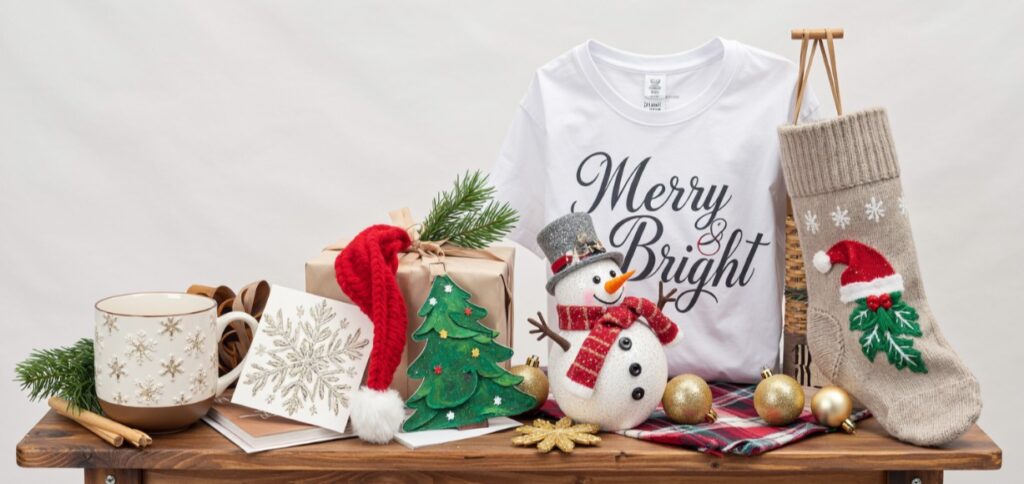
- Holiday apparel – Shirts, pajamas, or tote bags with festive quotes like “Merry & Bright.”
- Home décor – Wall signs, banners, stockings, and table centerpieces.
- Gift packaging – Custom gift tags, bags, and boxes.
Where to Find the Best Free SVG Files for Cricut (Christmas Edition)
With so many websites offering SVGs, how do you know which are safe, high-quality, and Cricut-compatible? Here are some of the top sources for downloadable free Christmas SVGs:
- Creative Fabrica Freebies – Daily free designs plus a huge Christmas bundle section.
- DesignBundles Free SVGs – Trusted source with festive giveaways each season.
- LoveSVG – Extensive library of holiday and everyday designs.
- Craft House SVG – Specializes in seasonal cut files, often free around the holidays.
- FreeSVG.org – A wide mix of community-uploaded SVGs, including Christmas themes.
How to Choose High-Quality SVGs
Not all SVGs are created equal. When downloading, look for:
- Clean cut paths (not overly complex designs that may tear materials)
- Layered files for multi-color projects
- Compatibility with Cricut Design Space
- Proper file labeling (SVG, not just PNG renamed)
Licensing and Personal/Commercial Use
Always check the license before downloading. Many free SVGs are personal use only (perfect for gifts). If you plan to sell products on Etsy or at craft fairs, ensure the file comes with a commercial license. Creative Fabrica often includes this, making it a safe choice for small businesses.
Step-by-Step Guide: Using SVGs with Cricut for Christmas
Ready to craft? Here’s a quick walkthrough:
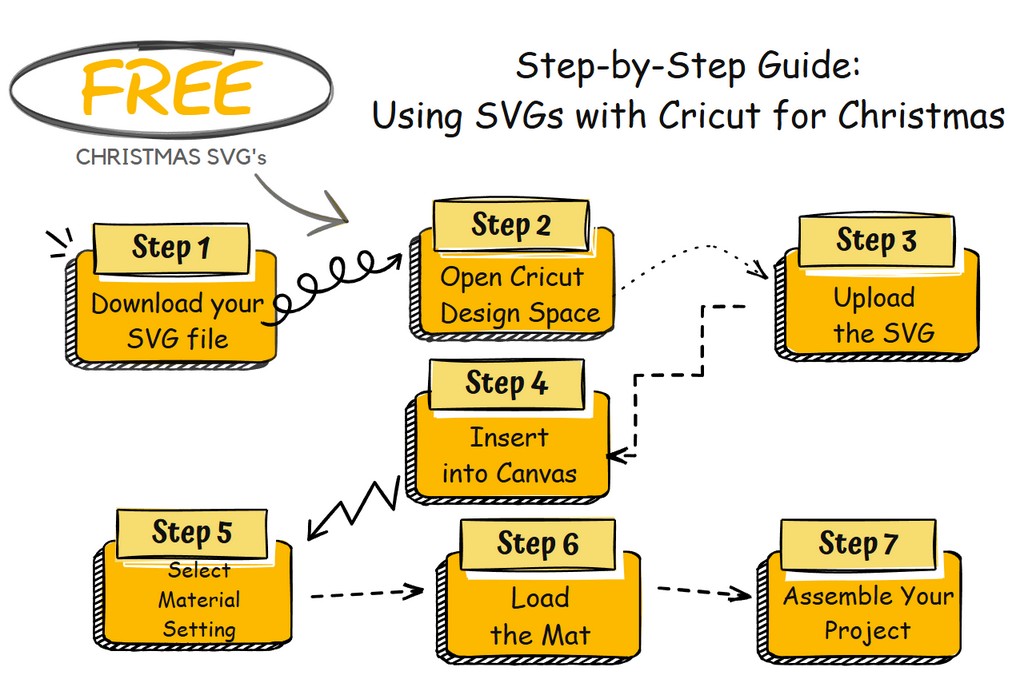
- Download your SVG file – Save it to your computer. If it comes in a ZIP folder, extract it.
- Open Cricut Design Space – Log in and start a new project.
- Upload the SVG – Click “Upload” → “Upload Image” → select your file.
- Insert into Canvas – Place your design into the workspace and resize as needed.
- Select Material Settings – Choose vinyl, cardstock, iron-on, or other depending on your project.
- Load the Mat – Place your material on the Cricut mat, insert it, and press “Go.”
- Assemble Your Project – Weed vinyl, transfer designs, or glue cardstock layers for a polished result.
Creative Ideas: Christmas Projects You Can Make
Need inspiration? Here are project examples you can make with free Cricut Christmas SVGs:
- Layered paper snowflakes for window decorations
- Personalized stockings with iron-on vinyl names
- Wooden farmhouse signs with “Merry Christmas” cutouts
- Christmas mugs with festive quotes (using permanent vinyl)
- Family matching shirts with Santa hats and names
- Gift tags shaped like trees, stars, or bells
Add your own twist: swap colors, layer materials, or combine SVGs for one-of-a-kind crafts.
Troubleshooting SVG Files & Cricut Tips
Sometimes things don’t go smoothly. Here are common issues and fixes:
- SVG won’t upload – Ensure you extracted from ZIP and selected the
.svgfile, not PNG/JPG. - Design cuts in pieces – Attach or weld layers in Design Space.
- Cuts are jagged – Use high-quality files with clean paths.
- Material tears – Check blade sharpness and adjust pressure settings.
- Sizing issues – Verify units (inches vs. pixels) when importing.
FAQ – Free SVG Files for Cricut Christmas
What are SVG files and why use them with Cricut?
SVGs are vector files that tell your Cricut exactly where to cut, ensuring clean, scalable designs. They’re preferred over raster images because they won’t lose quality when resized.
Are these Christmas SVGs really free?
Yes! Many designers offer free festive SVGs, especially during the holidays. Always check license terms, as some may only allow personal use.
How do I upload SVG files to Cricut Design Space?
Simply download, unzip, click “Upload” in Design Space, and add your file to the canvas. Once uploaded, you can resize or customize the design before cutting.
Can I sell products made with these free SVGs?
Only if the file includes a commercial license. Otherwise, they are personal use only, so double-check the file description before listing items for sale.
Why won’t my SVG file work?
You may have the wrong format or a corrupted download. Make sure you’re importing the .svg file, not a PNG, and re-download if the problem persists.
Conclusion & Next Steps for Holiday Crafting
With thousands of free Cricut Christmas SVGs at your fingertips, you can make this holiday season more Conclusion & Next Steps for Holiday Crafting
With thousands of free Cricut Christmas SVGs at your fingertips, you can make this holiday season more creative, personal, and meaningful than ever. From personalized gifts to festive home décor, these files make it easy to bring your designs to life without breaking the bank. Whether you’re crafting for fun, making heartfelt presents, or even running a small holiday shop, SVGs give you the freedom to create projects that truly stand out.
Next steps:
- Download free SVGs from trusted sources – Start building your collection today so you always have the perfect design ready when inspiration strikes.
- Try out a new Christmas craft project this week – Even a simple project like gift tags or ornaments can add a personal touch to your celebrations.
- Share your creations on social media and inspire others – Posting your projects helps you connect with a community of crafters and spread holiday cheer.
- Sign up for updates so you never miss new free files – Many SVG websites and crafting blogs release limited-time freebies, so staying connected ensures you don’t miss seasonal gems.
Holiday crafting is about more than just decorations—it’s about creating memories, spreading joy, and enjoying the process of making. Happy holiday crafting — may your Cricut be busy, your SVGs be festive, and your projects be merry & bright all season long!
Looking for more free SVG files for Cricut? Browse hundreds of SVG designs including funny quotes, coffee SVG files, dog SVG designs and seasonal graphics.
Browse More Free SVG Files